
It’s 4:40pm on a Friday. The accounts inbox goes quiet. Not slow-afternoon quiet. Quiet like nothing has arrived in forty minutes on a day that normally brings a hundred emails.
Someone tries to log in to Xero. Password rejected. They click “Forgot password” and wait for a reset email that never comes.
Someone else tries webmail. Wrong password there too.
By 5:15pm the business has no email, no accounting system, no Microsoft 365, and no way to reset any of it, because every reset link in every system is being delivered to a mailbox the business no longer controls.
Nobody was hacked in the way people picture it. No malware. No dodgy USB stick in the carpark.
Somebody logged in to the domain registrar using a password from a 2019 breach dump, and the registrar account had no multi-factor authentication on it.
I’ve made that scenario up. There is nothing unusual in it.
The domain is not “the website address”
Most business owners think of their domain as the thing after the @ in their email address, and the thing customers type into a browser. It’s a utility. Renewed every year or two. Filed under “sorted”.
The registrar account is actually the highest-value credential in the business. It sits above your email, your website, your cloud accounting, your CRM, your file storage, and your bank’s recovery process. Every one of those services verified you by proving you controlled an email address. Control the domain, you control the email address. Control the email address, you control everything that email address can reset.
Everything else has a fallback. The domain doesn’t.
What an attacker actually does with it
Once someone is inside the registrar account they have a handful of moves. None of them require much sophistication.
Change the nameservers
Nameservers answer the question “where does this domain live?” Swap them and every service attached to the domain quietly moves to infrastructure the attacker controls. Website, mail routing, subdomains, all of it.
The dangerous part is how ordinary it looks. No error message. No alert. Your website may keep resolving, because the attacker can point it at a copy of your real site so nothing appears broken to you or to your customers. Meanwhile mail is going somewhere else entirely.
By the time somebody notices, the change has propagated across the global DNS. Undoing it means proving to the registrar you are who you say you are, using an email address you can no longer receive mail on. That process takes days. Sometimes weeks.
Change the MX records
This is the subtler version, and the one that costs money.
The nameservers stay exactly where they are. The website stays up. Nothing visibly changes. But the MX records, which tell the world’s mail servers where to deliver your email, now point at a mail server the attacker runs. Every message addressed to your business lands in their hands first. In a well-executed version of this they read it, then forward it on to your real mailbox, so your staff keep receiving mail and never notice a thing.
Think about what arrives in a trade business inbox in a normal week. Supplier invoices. Bank correspondence. Client contracts. Password reset links. Payroll files.
The attacker doesn’t need to break into your systems. He’s reading your mail, waiting for a large invoice to pass through. When it does, he changes the bank account number on it and lets it continue on its way. Your accounts person pays it. It looks exactly like the invoice they were expecting, because it is.
Reset the passwords and go shopping
With mail interception running, the attacker walks the list. Xero. Microsoft 365. The company credit card portal. AWS. Any product where the recovery method is “we’ll email you a link.”
Each reset link is intercepted, used, and deleted before anyone sees it. Where MFA is enabled on those downstream services, it’s often configured to send codes to an email address on the compromised domain. Which the attacker is also reading.
Then the spending starts. Cloud compute spun up for crypto mining on your card. Purchases from your trade accounts, shipped elsewhere. Payroll redirected. Advertising accounts drained.
The moves people don’t think about
There’s more available than the obvious three.
The attacker can unlock the domain, pull the authorisation code, and transfer it to a registrar in another jurisdiction under a different account. Recovering a domain after transfer is a legal process, not a support ticket.
Your SPF, DKIM and DMARC records live in DNS. Strip them out and anyone in the world can send email that appears to come from your business. Your customers receive invoices “from you” with the wrong bank details, and every one of those emails passes authentication checks, because you no longer have any.
Certificate authorities validate ownership by checking a DNS record or an email to the domain. Anyone controlling either can obtain a legitimate, browser-trusted SSL certificate for your domain and stand up a perfect clone of your login page. The padlock is green. Nothing warns your customers.
Or nothing is stolen at all. Auto-renew simply gets switched off, the domain expires while you’re not looking, and someone picks it up the moment it drops.
And the registrant contact details can be edited, so the registrar’s own record of who owns the domain now names the attacker. Any recovery you attempt becomes a stranger arguing with a company that holds documentation showing otherwise.
Why you wouldn’t know
None of this makes any noise.
Businesses monitor their servers, their laptops, sometimes their firewalls. Almost nobody monitors their DNS. There’s no alert when a nameserver changes. Your antivirus has no opinion about MX records. Your IT provider, if they aren’t the ones holding the registrar credentials, may not even have visibility of the account.
Here’s what gets me about this class of attack. There’s no ransom note, no locked screen, no dramatic moment where you know. The whole point is to stay invisible long enough for one big payment to move through your inbox. Business email compromise typically runs for weeks before anyone notices, and most of those weeks feel completely normal.
The Privacy Act problem
If a third party is silently receiving your email, they are receiving personal information about your clients, your staff and your suppliers. Under the Privacy Act 2020 that’s a privacy breach, and if it has caused or is likely to cause serious harm it must be notified to the Office of the Privacy Commissioner and to the people affected.
Information Privacy Principle 5 requires you to take reasonable safeguards against loss, misuse and unauthorised access. An unprotected registrar account, in 2026, is hard to describe as a reasonable safeguard. The question afterwards is never “how sophisticated was the attack.” It’s “what basic controls were in place.”
Multi-factor authentication on the account holding the master key to your business is a basic control.
What good looks like
The minimum, today, non-negotiable: multi-factor authentication on the registrar account. An authenticator app, not SMS. That single change defeats the credential-stuffing attack described at the top of this article, which is how the overwhelming majority of these incidents start.
After that, in rough order of how much they matter:
Turn on registrar lock, so no transfer can be initiated without deliberate action.
Enable DNSSEC, so DNS responses for your domain are cryptographically signed and can’t be quietly forged in transit.
Move the registrar account’s recovery email off the domain it protects. If the domain falls, you cannot use the domain to recover the domain. This one trips up more businesses than anything else on the list, and it costs nothing to fix.
Use a password that exists nowhere else. Not one you’ve had since 2019.
Publish CAA records, restricting which certificate authorities are permitted to issue certificates for your domain.
Keep auto-renew on, with a payment card that hasn’t expired.
Write down who has access. Former staff, former web developers and former agencies routinely keep registrar logins for years after everyone has forgotten they exist.
Publish DMARC and monitor it, so you find out when someone is sending mail as you.
Put change monitoring on your DNS, so a nameserver or MX change raises an alert instead of a mystery.
Do the first one today
You don’t need to do all of that before Monday. You need to do the first one.
Log in to your registrar. Find the security settings. Turn on multi-factor authentication. It takes about four minutes.
If you don’t know who your registrar is, or you can’t get into the account, or you’re not sure whether the recovery email sits on your own domain, or you inherited the domain from a web developer you haven’t spoken to in three years, you’re in ordinary company. That’s also precisely the position an attacker hopes to find you in.
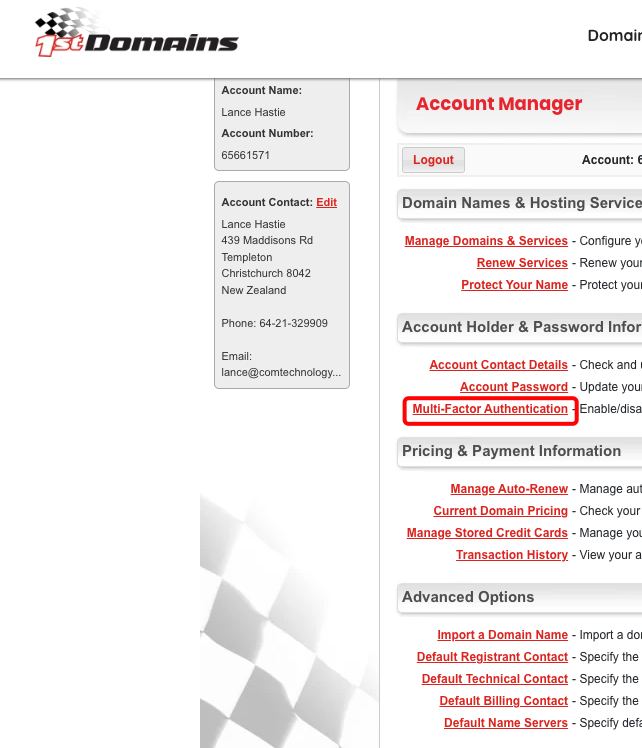
If your domain name is held with 1st Domains – they make it easy to add MFA. Log in and click ‘Manage Account’. Click to enable Multi-Factor Authentication (MFA)
If in doubt – reach out.
Was this of value to you? If so and you feel the desire: Buy Me A Coffee